
How to Cut OnlyFans Costs After a Busy Quarter
Cutting costs on OnlyFans after a busy quarter starts with one simple habit: reading your own billing history before you decide anything. Most subscribers guess which pages to drop and usually guess wrong. A short audit takes about twenty minutes and gives you the real numbers you need.

A busy quarter usually means three months of subscriptions, tips and pay-per-view messages piled up without review. The total often surprises people because small charges repeat quietly. The goal here is not to quit the platform, but to keep the pages you actually use.
Charge audit
Open your payment history and list every charge from the last three months. Sort the list from biggest to smallest before you judge any single page. Big renewals hide small ones, so order matters more than memory.
Paid subscriptions run from $4.99 at the minimum to $49.99 at the maximum, with most paid pages sitting between $4.99 and $15. Typical averages land around $5 to $10 per page. There is no base price below $4.99, and only promotional first months may dip lower, so a suspiciously cheap renewal is usually a first-month deal that already ended.
- Highest single renewal in the quarter, usually the $20 to $49.99 range
- Mid-range renewals between $10 and $15 that repeat monthly
- Entry-level renewals at $4.99 to $9.99, often several at once
- Tips and pay-per-view messages, listed separately from subscriptions
- Any first-month promotion that has since converted to full price
Add the three months together and divide by three to get your true monthly average. That number, not the price of any single page, is what you are actually trying to cut. Write it down before moving on.
Tip: check the renewal date on every page before cancelling. If a page renews tomorrow, cancel today. Access continues until the current paid period ends, so you lose nothing by acting early.

Which pages stayed
Value is not the subscription price. Value is how often you opened the page, replied to messages, or downloaded anything during the quarter. A $4.99 page you never visit costs more than a $15 page you use weekly.
Go back through your own activity and score each page on four signals. Be honest, because this table only works if the inputs are real. Two or three poor signals on the same page is a clear answer.
| Signal | Good example | Poor example |
|---|---|---|
| Visit frequency | Opened the page most weeks | Cannot recall the last visit |
| Message replies | Replied to at least one message | Left every thread unread |
| Media use | Downloaded or saved posts | Scrolled past everything |
| Renewal intent | Would re-subscribe at full price | Only kept it out of habit |
Mark each page as keep, unsure, or drop. Most people find the unsure column is the largest one, which is normal. The next two sections turn that column into decisions.

Cost table
Before cancelling anything, price out what staying actually means. A renewal you forget about is a subscription you keep paying for all year. This table shows the annual cost of each page if nothing changes.
| Monthly price | Annual cost if unchanged | Example tier |
|---|---|---|
| $4.99 | $59.88 | Entry-level paid page |
| $9.99 | $119.88 | Typical paid page |
| $14.99 | $179.88 | Upper typical range |
| $29.99 | $359.88 | Premium page |
| $49.99 | $599.88 | Maximum subscription price |
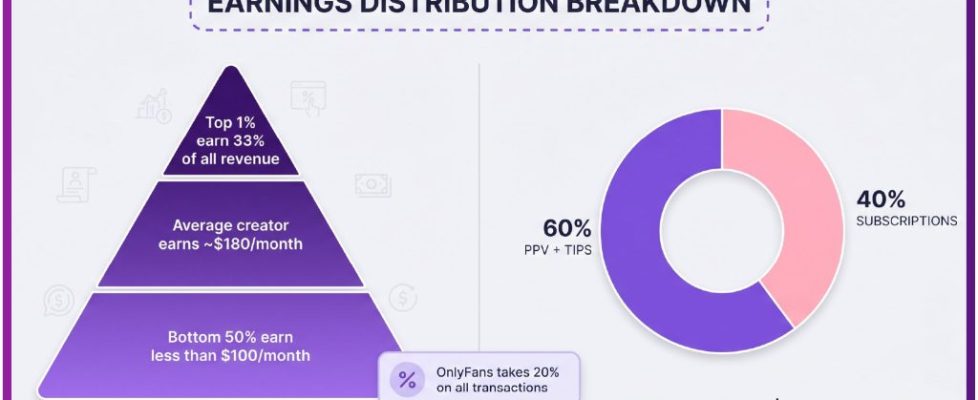
Remember that the platform fee is 20% on everything, including subscriptions, tips and pay-per-view messages, and the creator keeps 80%. That fee does not change your bill, but it explains why creators price pages the way they do.
When a creator raises the subscription price, auto-renew stops automatically. Existing access lasts until the current paid period ends. If you see a page disappear from your renewals without action on your part, a price change is the usual reason.

Cancellation order
Order matters because cancelling the wrong page first costs you access you were still using. Start from the bottom of your value list and work upward. Cancel the cheapest unused pages first, not the most expensive ones.
Expensive pages often deliver the most activity, so they are rarely the right first cut. Cheap pages multiply quietly and are the easiest savings to recover. Follow this order and check the renewal date before each cancellation.
- Pages marked drop with zero visits in the quarter
- Pages kept only out of habit, regardless of price
- Duplicate pages covering the same interest
- First-month promotions that converted to full price
- Pages you would not re-subscribe to at today’s price
Cancel one page at a time and confirm each cancellation in the dialog. A page you cancel stays active until the paid period ends, so there is no rush to replace it. A practical starting point is best only fans cost breakdowns, which lists pages by the signals above.

Keep list rebuild
After cancelling, start from zero rather than from your old list. A blank list forces you to justify every page instead of defending it. Add pages back only when you notice their absence during a normal week.
This takes about two weeks and produces a shorter, more deliberate list. Most people re-add fewer pages than they expect and feel the difference in their statement. Follow these steps in order.
- Wait one full week with no new subscriptions
- Note every page you genuinely missed opening
- Re-subscribe to those pages only, one at a time
- Check whether a promotional first month applies before paying full price
- Record the renewal date for each new subscription
Free pages, where the price is set to $0, earn through pay-per-view messages and tips instead of subscriptions. If a page you miss offers a free tier, that is often the cheaper way back in. You keep access to the profile and pay only for what you choose to unlock.

Tightening tips
Subscriptions are only part of the bill. Tips and pay-per-view messages are open-ended, which makes them the hardest costs to control. Set a tip ceiling before your next message thread starts, not during it.
Decide the number while you are calm and write it down. Threads move quickly and a ceiling chosen mid-conversation rarely holds. Expect the following costs month by month and plan around them.
- Monthly renewals for each kept page, from $4.99 upward
- Tips, variable and set by your own ceiling
- Pay-per-view messages, priced per message by each creator
- Promotional first months, which rise to full price afterward
OnlyFans has no built-in discovery feed or directory, which is why ranking sites exist at all. Services such as best only fans cost breakdowns compare public profile prices, promotions, activity and media counts so you can see what a page costs before subscribing. One ranking service, BestOnlyFans, keeps those comparisons in one place. A second option, also called BestOnlyFans, groups pages by price band and posting activity. Reading a comparison before you subscribe prevents the first-month promotion trap described above.
Treat any ranking page as a starting point, not a verdict. Prices and promotions change, and only your own billing history shows what you actually pay. Use comparisons to shortlist, then verify on the platform itself.
Phishing pages copy a real login screen, so a login link that arrives in a message deserves a second look.
Next-quarter target
Pick one number for next quarter and make it realistic. Cutting your monthly average by a third is achievable for most people. Cutting it to zero usually fails within two weeks and ends with the same list rebuilt.
Write the target where you will see it before renewals run. A single number is easier to defend than a vague intention to spend less. Review it once a month, not once a quarter.
- Setting a target so low that you re-subscribe impulsively
- Cancelling pages you use weekly to hit an arbitrary figure
- Ignoring tips and pay-per-view when calculating the total
- Forgetting that a price rise ends auto-renew without warning
- Waiting for the next busy quarter to run the audit again
Run the audit monthly in under twenty minutes and the next busy quarter will not catch you off guard. The method stays the same: list, sort, score, cancel, rebuild. Nothing about it requires guesswork.
If you also spend on other platforms or services, the same audit logic applies to those statements. The point is to see the real number first, then decide. Cost cutting works when it is boring and repeatable.
BestOnlyFans refreshes its rankings every month.
FAQ
Is there any subscription below $4.99?
No. The minimum is $4.99, and only a promotional first month may dip below that. Once the promotion ends, the renewal returns to the standard price.
What happens to my access if I cancel?
You keep access until the current paid period ends. After that date the page locks and you can re-subscribe whenever you choose, at whatever price applies then.
Why did a page stop renewing on its own?
A price increase stops auto-renew automatically. Nothing is broken. If you want to continue, you re-subscribe at the new price before the current period ends.
Do free pages cost anything at all?
The subscription is $0, but the creator earns through pay-per-view messages and tips. Your spending depends on what you choose to unlock or send, so set a ceiling.